
Apple has announced it will introduce stricter controls around Full Disk Access on macOS, explicitly naming AI agents as the reason. The permission — which grants an app read access to a user’s files, mail, messages, and browsing history in a single grant — will soon require what Apple calls “very explicit user action” before anyone can switch it on. The move, announced on October 2, 2026, marks the first time a major platform has publicly tied a core privacy control directly to the risks of autonomous desktop AI agents.
Key Facts
- Apple announced new controls for macOS Full Disk Access on October 2, 2026, via its Developer News site.
- Full Disk Access covers files, mail, messages, and browsing history, and was originally built so backup apps could work properly.
- Apple said “some developers” are using the permission in ways that expose everything on a user’s system without their full knowledge and understanding.
- The change will require “very explicit user action” before an app can be granted this level of access.
- The announcement follows a public dispute over Meta’s Muse reading a journalist’s private messages and a reported flaw in the ChatGPT Mac app.
- No date, macOS version, or named app was given for the new controls.
What Apple announced
In a post titled “Updates to Full Disk Access in macOS,” Apple said the permission largely bypasses the privacy controls that back its developer APIs so that backup apps can function on the Mac. According to the company, some developers now use the permission in ways that could put users at risk by exposing “everything on their systems — including files, mail, messages, and even browsing history — without users’ full knowledge and understanding.”
Apple added that for communication apps, the exposure can extend beyond the user to the privacy of the people they talk to — and that “as AI agents become increasingly capable and autonomous, the risks associated with this level of access will grow substantially.”
Going forward, users who “genuinely wish to grant an app this extraordinary level of access” will be able to do so only through “very explicit user action,” Apple said, calling it critical that users clearly understand the risks before granting such access so they can make informed decisions about their own data and privacy. The company named no app, set no date, and gave no macOS version for the change.
Why AI agents triggered the crackdown
The statement landed days after a public dispute over Meta’s Muse. Inc. columnist Jason Aten reported that the Muse agent on his Mac mini surfaced details from his private Messages history — including a note from his editor — even though he says Full Disk Access was switched off on his machine.
Meta disputes that account. Its executive David Singleton has said the Messages integration in the Muse Mac app is opt in, and that Muse can only read Messages content if Full Disk Access is granted and the app’s separate Messages connector is enabled. Meta also noted that granting Full Disk Access triggers a system dialog and a trip into macOS Settings, where users must manually confirm their intent a second time — steps the company argues make unauthorized access impossible if followed as designed.
A separate Wired report cited by TechCrunch found a flaw in the ChatGPT Mac app that could have allowed attackers to reach sensitive data. Apple’s note names neither incident, but the timing is unmistakable: desktop AI agents are the fastest-growing class of software asking for the broadest permissions on the Mac.
The permission gap between backup apps and AI agents
| Permission | Original purpose | How AI agents use it |
|---|---|---|
| Full Disk Access | Let backup apps copy an entire drive | Read messages, mail, files, and browsing history to answer personal queries |
| Contacts | Find friends in a chat app | Cross-reference who you talk to with your schedule |
| Automation | Script routine tasks | Draft and send texts and emails on your behalf |
That gap — a permission designed for silent, wholesale copying being repurposed to power chatty, proactive assistants — is exactly what Apple says it is closing.
Desktop agents are arriving everywhere
The permission fight is unfolding as agent platforms compete to own the desktop. OpenAI recently introduced Dots, always-on AI agents that each run on their own isolated cloud computer and browser, powered by the company’s GPT-6 Astra engine. According to the announcement, a Dot can connect to more than 4,000 apps through a plugin ecosystem, pursue goals in the background in a read-only “proactive research” mode, and carry task context across ChatGPT, Slack, Teams, and voice calls.
The Verge’s hands-on found Dot can operate desktop software such as Blender and GIMP inside a virtual machine while also reaching into the user’s personal computer — and described it as enterprise productivity software first, consumer assistant second. It is currently limited to top-tier subscribers, with one Dot per user.
Meta’s Muse takes the alternative route of running directly on the device with deep macOS permissions, which is precisely why it ended up at the center of the Full Disk Access dispute. As agent platforms push deeper into personal data, more stories on this shift are being collected on the Technology section of Watan News.
What Mac users should do now
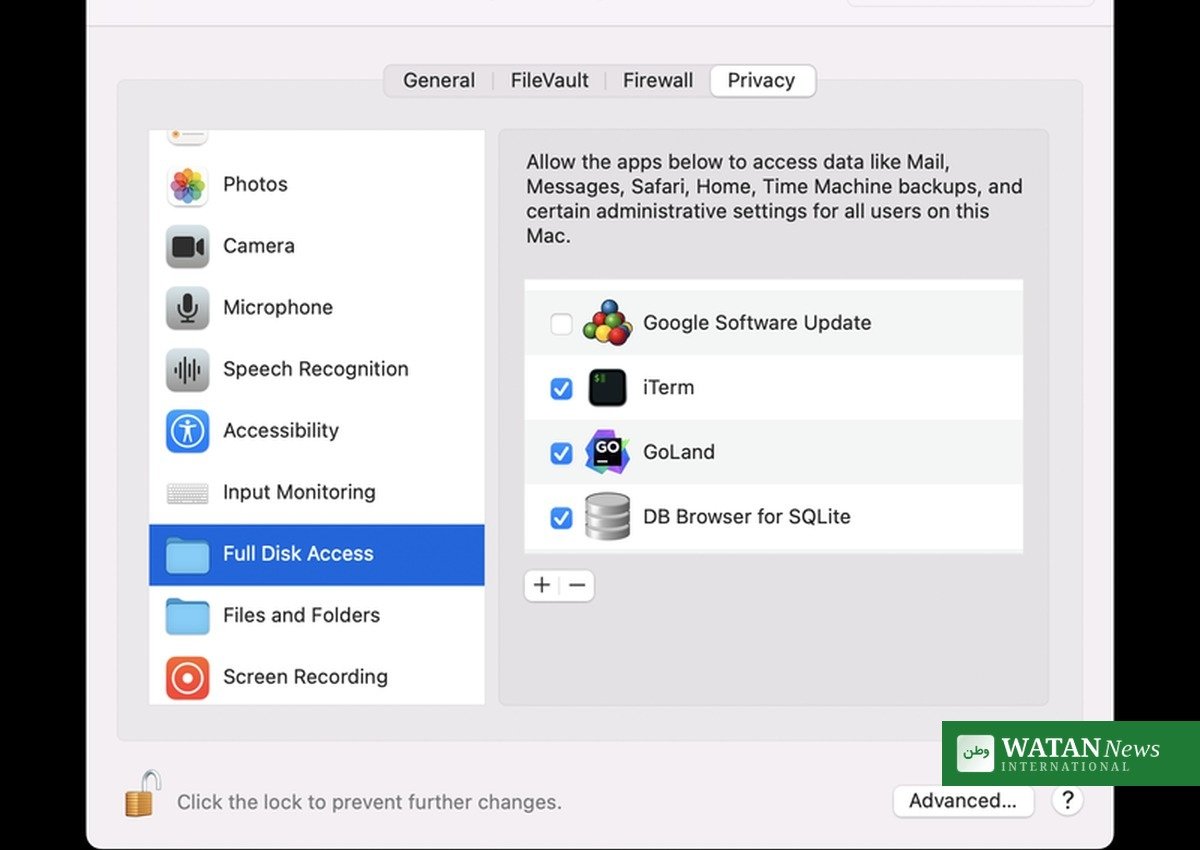
Users can already audit which apps hold Full Disk Access by opening System Settings, navigating to Privacy & Security, and checking the Full Disk Access list. Any AI assistant that does not strictly need whole-disk access should be removed — and if an agent asks for the permission during setup, Apple now wants that grant to be a deliberate, informed choice rather than a bundled setup-screen checkbox.
Apple’s warning to users is plain: an agent holding this key can see far more than the task in front of it, including the private words of the people who write to you.
Conclusion
Apple’s move is a first shot in what is likely to become a platform-wide rebalancing of power between AI agents and the data they feed on. The company stopped short of banning agents from Full Disk Access — it is still betting that some users genuinely want an assistant with whole-Mac vision — but the era of acquiring the most powerful permission on the Mac with a single quiet checkbox is ending.